Guides
How AI Turns Text Into Images: A Plain-English Guide
Why This Is Confusing (And Doesn't Need to Be)
Type "a golden retriever wearing sunglasses on a surfboard" into an AI tool, and a few seconds later, you have a fully-formed image. It feels like magic, and most explanations of how it works go straight into dense technical language that assumes you already have an engineering degree.
You don't need one. The core ideas behind AI image generation are actually pretty intuitive once you strip away the jargon — they're just clever variations on old, familiar tricks like "guess and check" and "start rough, then refine."
Below are the three main approaches in use today, explained the way you'd explain them to a curious friend.
Approach 1: Diffusion — Sculpting an Image Out of Noise
This is the technique behind Midjourney, Stable Diffusion, and the current version of DALL-E — so if you've used any AI image tool in the last couple of years, this is almost certainly what was happening behind the scenes.
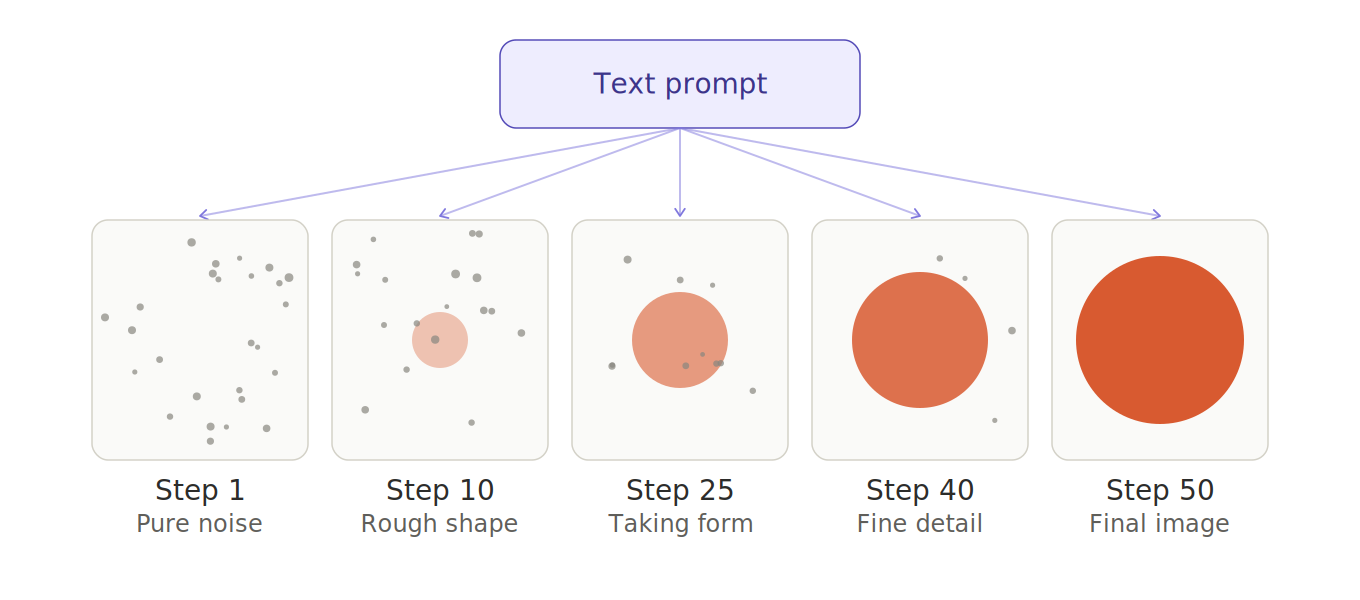
The idea in one sentence: Start with a canvas of pure random static (like old TV snow), and slowly clean it up, step by step, until a real image emerges — with your text prompt guiding every step of the cleanup.
Think of it like a sculptor who starts with a rough, shapeless block of marble. At every stage, they chip away a little more, always keeping in mind the final statue they're aiming for. A diffusion model does the same thing, except instead of chipping marble, it's removing "noise" from an image, one small pass at a time — usually dozens or even hundreds of passes — until a coherent picture appears.
The AI didn't memorize your exact image somewhere and pull it up. It learned, from studying millions of image-and-caption pairs, what "clean, realistic images" tend to look like, and how to nudge a noisy canvas closer to something that matches the words you typed.
Why it's the most popular approach: it currently produces the sharpest, most photorealistic, most stylistically flexible results of any method. The tradeoff is speed — because it works in incremental steps, it's slower than some alternatives (though newer speed-optimized variants are closing that gap fast).
But how does the text actually steer the cleanup?
This is the part most explanations skip, and it's the key to the whole process: at every single step of removing noise, the model checks in with your prompt before deciding what to clean up next.
Here's the trick. Your prompt — "a golden retriever wearing sunglasses on a surfboard" — first gets converted into a kind of numerical fingerprint that captures its meaning (this is done by a separate text-understanding model, similar to the language-understanding part of a chatbot). That fingerprint doesn't just get glanced at once at the start; it gets consulted at every one of the dozens of cleanup passes.
Think back to the sculptor analogy, but add one detail: the sculptor is working from a written description instead of a photo, and before every single chisel strike, they pause and re-read the description, asking "given what this block looks like right now, what's the next stroke that moves it closer to that description?" Early strokes are broad and rough — establishing that there should be a dog-like shape here, a surfboard-like shape there. Later strokes get progressively more specific — fur texture, sunglasses reflections, water spray — because by that point the rough shape is already settled and the prompt's more detailed elements can guide the finer work.
Mechanically, the model was trained on millions of image-and-caption pairs, so it has learned strong associations between words and visual patterns: it knows what pixel patterns tend to co-occur with the word "surfboard" or "sunglasses." At each denoising step, it essentially asks, "of all the ways I could nudge this noisy canvas to make it less noisy, which nudge moves it toward patterns that match this prompt's fingerprint?" — and takes that nudge. Repeat that dozens of times, and the random static gradually resolves into an image whose patterns match the words you typed.
There's also a dial that controls how strongly the prompt steers each step, often called guidance strength. Turn it up, and the model sticks closely to the literal prompt at every step, sometimes at the cost of looking a bit rigid or over-composed. Turn it down, and the model leans more on what it's learned "looks generally realistic," producing more natural but less literal results. This is why the same prompt can produce noticeably different images depending on a tool's settings — the prompt is being consulted with different degrees of insistence at each cleanup step.
Approach 2: Autoregressive Generation — Building an Image One Piece at a Time
This approach powered the original DALL-E, and it borrows its core idea directly from how AI chatbots write text.
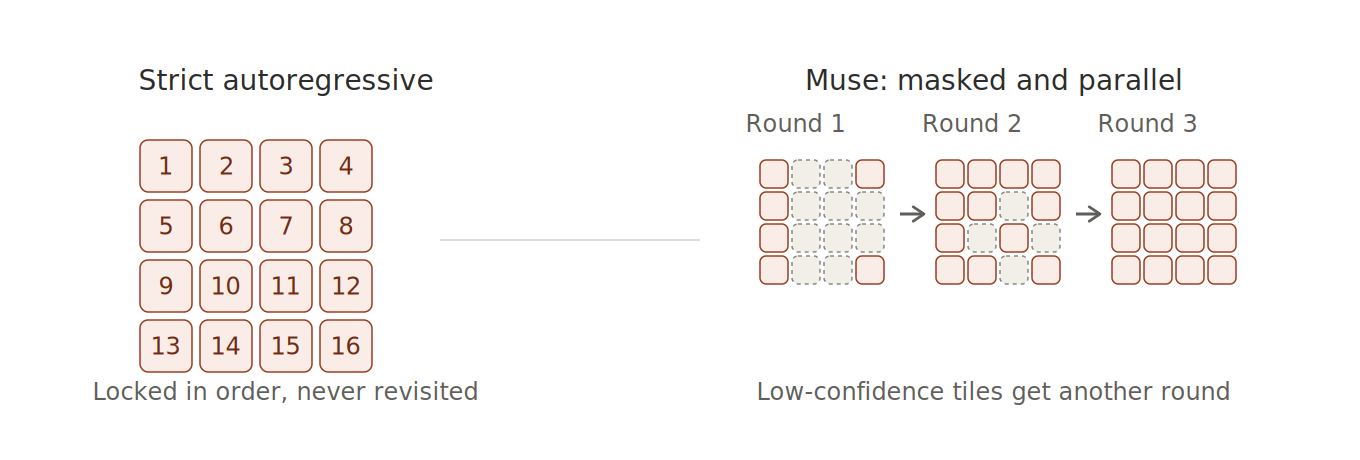
The idea in one sentence: Break an image down into a grid of small tiles, then generate those tiles one at a time, left to right, top to bottom — the same way a chatbot generates one word at a time to write a sentence.
When a chatbot writes a reply, it's not planning the whole sentence in advance — it's predicting the most likely next word, over and over, based on everything written so far. Autoregressive image models do the exact same thing, except each "word" is a small visual tile instead of a piece of text. The model learned, from studying huge numbers of images, which tile is likely to come next given the tiles already placed and the text prompt guiding it.
Why it's less common today: it tends to be slower and somewhat less detailed than diffusion for high-resolution images, since every single tile has to be generated in strict sequence. That said, this approach is having a bit of a comeback, because it lets one AI model handle both text and images using the exact same underlying process — which is appealing for building a single system that can both understand and generate visual content.
But how does the text actually steer the tile-by-tile process?
This one is arguably the most direct of the three, because it borrows straight from how chatbots already use your prompt to write text.
Go back to the puzzle analogy: imagine placing tiles one at a time, but before placing each tile, you glance at two things — the written description, and every tile you've already placed. The next tile you choose has to make sense given both. Early on, when few tiles are down, the description does most of the work (it's telling you "this is a dog on a surfboard," so the first tiles should start forming that rough shape). Later, once a lot of tiles are down, both the description and the emerging picture jointly narrow down what the next tile should probably look like.
Mechanically, this is done the same way a chatbot decides its next word: the model has learned, from studying huge numbers of captioned images, which image tile is statistically likely to come next given the prompt and the tiles placed so far. It's consulting the prompt at every single tile — not just once at the start — which is why the same underlying mechanism (predicting "what comes next, given everything so far") can generate both a sentence of text and a grid of image tiles, just with a different vocabulary (words vs. visual tiles).
Does it ever go back and fix an earlier tile?
In the classic version of this approach, no — never. Once a tile is placed, it's locked in for good, the same way a chatbot doesn't go back and rewrite an earlier word once it's typed it out. If an early tile choice turns out to be a poor fit for how the image develops — say, a shadow angle that doesn't quite match the lighting the rest of the image ends up with — there's no mechanism to correct it. The model can only try to make later tiles work around the earlier choice, not fix the choice itself. This is part of why strict tile-by-tile models can occasionally produce images where something subtly drifts partway through, like a perspective or proportion that feels slightly "off."
There's a close cousin of this approach, though, that was specifically designed to fix this limitation — Google's Muse is the best-known example. Instead of committing to tiles one at a time in strict left-to-right order, Muse works more like filling in a puzzle in rounds rather than in a single fixed sequence:
- It starts by making a rough guess at every tile in the image all at once, with most of them held in a placeholder "blank" state rather than actually committed.
- It keeps whichever guesses it's most confident about, and throws out its least confident guesses — re-blanking them.
- It then re-guesses those re-blanked tiles, now with the benefit of seeing the tiles it kept from the previous round, and repeats this process for several rounds.
The effect is that an early guess can effectively get overwritten later on — if the model becomes more confident about a different value for a tile once more of the surrounding image has taken shape, it simply discards the earlier guess and replaces it. That's a meaningful step closer to how diffusion behaves, where the whole canvas gets revisited repeatedly, just applied here to discrete tile choices instead of continuous noise. The tradeoff is that Muse isn't strictly comparable to "one tile at a time" anymore — but it's still typically faster than classic tile-by-tile generation, since it resolves many tiles per round in parallel rather than one at a time in sequence.
Muse also borrows a version of the "guidance strength" dial from diffusion, described earlier in this post: rather than applying the prompt's influence at full strength from the very first round, it starts weak and gradually increases across rounds, so the earliest, roughest guesses are shaped mostly by general visual plausibility, while later, more confident rounds are held more tightly to the prompt. It's the same underlying idea as diffusion's guidance dial — how strongly the prompt steers each step — just scheduled to ramp up over the course of generation rather than held at one fixed setting throughout.
So there are really two distinct tile-based approaches worth knowing about, not one: strict autoregressive generation (simple, directly mirrors how a chatbot writes a sentence, but no revision once a tile is placed) and masked/parallel generation like Muse (allows tiles to be revised across multiple rounds, at the cost of no longer being a strict one-tile-at-a-time process).
One clarification worth making: Google's Muse was published as a research paper and demonstrated as a project, not released as a consumer product you can go sign up for the way Stable Diffusion, Midjourney, or DALL-E were. So you're more likely to run into it in technical writeups (like this one) than in a tool you can actually open and try — it's included here because the underlying idea is genuinely useful for understanding how tile-based generation can work, not because it's something you can download today.
Approach 3: GANs — Two AIs Competing Against Each Other
This was the dominant approach before diffusion took over, and it's a genuinely clever idea worth understanding even though it's less common in today's leading tools.
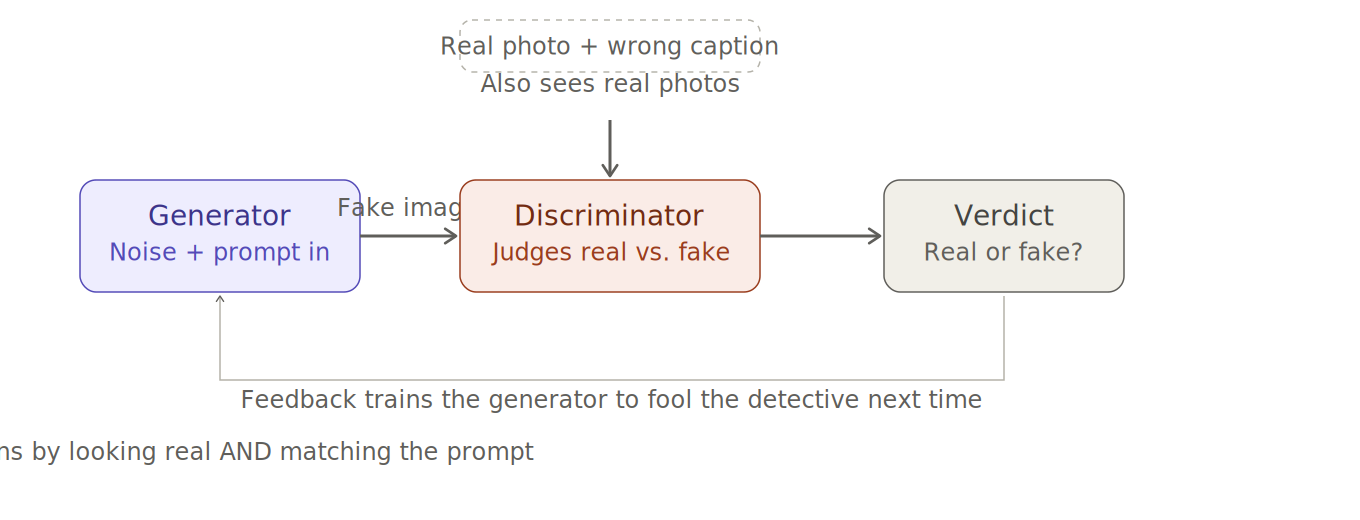
The idea in one sentence: Train two AI systems at once — a "Forger" that creates fake images, and a "Detective" that tries to catch the fakes — and let them compete until the Forger gets so good that the Detective can't tell real from fake anymore.
Picture an art forger and an art detective locked in a room together, competing round after round. Early on, the forger's fakes are obviously bad, and the detective catches them easily. But every time the forger gets caught, it learns from the mistake and tries again. Every time the detective is fooled, it sharpens its eye. After enough rounds, the forger has become so skilled that its fake images are indistinguishable from real ones — even to a very well-trained detective.
That's essentially what a Generative Adversarial Network (GAN) is: two neural networks, a "generator" and a "discriminator," locked in this same competitive loop during training.
Why it's used less today: GANs can generate images very quickly (often in a single step, unlike diffusion's many steps), but historically they've been harder to train reliably and tend to produce less variety in their output. Diffusion models overtook them by producing more consistent, more detailed, and more diverse results — though GANs remain relevant in situations where speed matters more than perfection.
But how does the text actually steer the forger?
Unlike diffusion, a GAN doesn't get dozens of chances to check in with your prompt along the way — it generates its image in one continuous pass. So the prompt has to be built into that single pass from the very start, and the training process has to make sure the forger actually pays attention to it.
Picture our portrait artist again, but now they've read a written description once, formed a mental image, and paint it start to finish in one sitting — informed by the description throughout, but without ever pausing to re-check partway through. Mechanically, the AI turns your prompt into a numerical fingerprint (same basic idea as before) and threads that fingerprint through the generator's internal steps, nudging things like the overall style, color, and composition at each stage of the single pass.
Here's the part that's easy to miss, though, and it's really the key trick that makes this work at all: it's not enough to just feed the prompt into the forger. Left to its own devices, a forger being judged only on "does this look like a real photo?" has no reason to actually paint what you asked for — it could paint any convincing image and still fool the detective. So during training, the detective is given a second job: alongside real and fake images, it's also shown real, genuine photos paired with deliberately wrong captions (a real photo of a cat labeled "a red sports car") and taught to reject those as "fake" too. That forces the forger to learn that "passing inspection" means both looking real and matching the description — not one or the other.
More advanced versions go a step further, letting different parts of the image pay attention to specific individual words rather than just the prompt as a whole — so the part of the image becoming "sunglasses" specifically checks in against the word "sunglasses," similar in spirit to how diffusion consults your prompt at each cleanup step, just packed into a single pass instead of spread across many.
So, Which One Is "Best"?
There isn't a single best approach — it depends on what you're optimizing for:
| If you care most about... | Best-suited approach |
|---|---|
| Photorealism and image quality | Diffusion |
| A single AI that handles both text and images | Autoregressive |
| Speed (near-instant generation) | GANs |
In practice, the tool you're using has already made this tradeoff for you. Midjourney, Stable Diffusion, and modern DALL-E all lean on diffusion because, right now, it offers the best overall balance of quality and flexibility — which is exactly why it's become the default choice across the industry.
What About Newer Tools Like Nano Banana?
Google's "Nano Banana" (the nickname for Gemini's built-in image generation) is a useful example of where things are headed next — not a brand-new fourth approach, but a meaningful twist on diffusion.
Under the hood, it's still diffusion. Nano Banana still starts from noise and gradually cleans it up into an image, the same core process described above. What's different is where that process lives.
The prompt isn't handed off to a separate tool — it's understood by the same model doing everything else. Older tools like Stable Diffusion have a clear division of labor: one component reads and understands your text, then hands that understanding to a completely separate component that does the drawing. Nano Banana instead builds image generation directly into Google's Gemini chatbot itself — the same model that understands your prompt is also the one drawing the picture, using one shared "vocabulary" for text and images instead of translating between two separate systems.
The premium version "thinks" before it draws. Nano Banana Pro generates a couple of rough draft "thought images" first, essentially checking whether the overall composition and layout make sense, before committing to the final detailed diffusion pass. This is part of why it tends to be noticeably better at tricky things like rendering readable text inside an image or getting complicated layouts right — problems have a chance to get caught before the expensive detailed-drawing step even begins.
It edits conversationally instead of starting from scratch each time. Ask Stable Diffusion to "make the shirt red," and it typically regenerates a whole new image from a new noisy canvas — you might get the red shirt, but everything else could shift too. Nano Banana, because it already deeply understands the image you're looking at (not just the prompt that made it), can make that one targeted change and leave everything else alone — much closer to how you'd ask a human designer to tweak an existing file rather than draw a brand new one.
A closer look at the actual steps
Here's roughly what happens between you hitting "enter" and an image appearing, broken into the stages Nano Banana actually goes through:
- Reading everything as one shared language. Your typed prompt gets broken into small chunks (tokens), and if you've uploaded a reference image, that gets broken into chunks too — using the same underlying "vocabulary" as the text. They're then lined up together in a single sequence, so the model isn't looking at "a prompt" and "a picture" as two different kinds of things — it's reading one combined stream of information.
- Actually understanding what you meant. The model's attention layers — the same mechanism a chatbot uses to understand which words in your sentence relate to which other words — build up a rich internal picture of what you're asking for: not just the objects you mentioned, but implied details like where things should sit relative to each other, what the lighting should feel like, and what materials or textures are implied.
- A rough mental sketch, checked before committing (Pro tier only). Before generating the real, detailed image, Nano Banana Pro produces one or two small, rough "thought" images — quick internal drafts used purely to sanity-check the overall composition and layout. Think of it like a designer's thumbnail sketch: cheap to throw away if the composition's wrong, before spending real time on a polished version. This step is what particularly helps with getting tricky things right, like text that needs to be spelled correctly inside the image, or a layout with many separate elements that need to relate to each other sensibly.
- Starting the real canvas. Once the model is satisfied with the rough plan, it sets up the actual noisy starting canvas — the same kind of random static that kicks off any diffusion process.
- The familiar diffusion clean-up. From here, it's the same step-by-step denoising process described earlier in this post: the noisy canvas gets gradually refined, with the model's rich understanding of your prompt (and its own rough sketch, if it made one) consulted at each step, until a finished image emerges.
The main takeaway from this closer look: everything before step 4 is new compared to older tools — it's extra understanding and planning layered on before diffusion even starts — while the actual image-rendering step at the end is the same core diffusion process this whole post has been describing.
The takeaway: the three approaches above still describe how images actually get made. What's changing is that diffusion is increasingly becoming one step inside a larger, unified AI model — rather than a standalone tool that a separate chatbot hands prompts off to.
A Naming Collision: Meta's Muse Image
Here's a genuinely confusing coincidence worth clearing up. Earlier in this post, "Muse" referred to Google's 2023 research project on masked, parallel tile generation. In 2026, Meta launched a completely unrelated product that also happens to be called Muse — specifically, Muse Image, an image generator from Meta Superintelligence Labs built into Meta AI, Instagram, and WhatsApp. Same name, different company, different architecture, three years apart. If you search "Muse" today, you'll mostly find Meta's product, not Google's research paper — so it's worth knowing these are two unrelated things.
Meta's Muse Image is closer in spirit to Nano Banana than to Google's research project: most reporting indicates a diffusion-style generation core under the hood, wrapped in an agentic reasoning layer rather than a bare prompt-to-pixels pipeline.
It reasons before it renders, using a separate planning model. Muse Image doesn't work alone — it pairs with a companion reasoning model (Meta calls it Muse Spark) that plans the composition, decides how to handle multi-step or multi-object instructions, and only then hands things off to the part that actually paints pixels. This is conceptually similar to Nano Banana Pro's "thought image" step, but implemented as a distinct planning model working alongside the image generator rather than the image model quickly sketching its own draft.
It can look things up before drawing. One genuinely distinctive feature: Muse Image can pull in real-time web context while reasoning through a prompt. Ask it to generate something that depends on a real, current fact (say, what a specific real building actually looks like), and it can check before committing to pixels, rather than relying purely on what it learned during training.
It blends multiple reference photos by reasoning about them, not just averaging them. Combine a selfie with a vacation photo, or place a pet into a painting, and Muse Image analyzes how the different reference images relate to each other before generating — aiming to preserve each subject's identity and consistency, rather than just blending the underlying image data together.
It edits with the same natural-language, in-place approach as Nano Banana. Circle or annotate part of an existing image, describe the change in plain language, and it modifies just that part while leaving the rest alone — the same conversational-editing idea covered earlier, rather than regenerating the whole image from scratch.
The bigger-picture pattern holds here too: Meta's Muse Image isn't a fourth fundamental way of generating images — it's another example of diffusion being wrapped inside a larger reasoning system, following the same overall direction as Nano Banana, just with its own particular set of capabilities (web lookup, multi-reference blending) layered on top.
Where Does a Tool Like Kognie Fit Into All This?
Kognie, an agentic graphic design platform, is a useful example of a different kind of layer that sits on top of everything described above — not a fourth way of turning text into pixels, but a system which uses different image generators at different points in its pipeline. Additionally, it also uses various Python libraries for image manipulation and deep learning models for image segmentation, etc.
The generated image is one ingredient, not the whole dish. Kognie wraps that single generated image inside a larger process: a Layout Agent decides where it sits and how it's cropped, a Style Agent matches its color and treatment to everything around it, a Brand Agent checks it against a stored brand identity, and a Critic Agent reviews the assembled result before a person sees it. None of that is something a diffusion model, an autoregressive model, or a GAN does on its own — generating a picture and turning it into a finished, on-brand, platform-ready design are two different jobs.
There's a genuine family resemblance to Nano Banana Pro's “thought image” step, though. Nano Banana Pro's habit of sketching a rough composition before committing to a detailed diffusion pass, described earlier in this post, is philosophically similar to Kognie's Critic Agent reviewing a design — both are a check-before-you-commit idea. The difference is what's being checked: Nano Banana Pro's check happens inside the picture-generation step itself, confirming one image's composition holds together before the expensive detailed pass. Kognie's Critic Agent check happens one level up, after an image already exists — reviewing the entire finished design for hierarchy, brand consistency, and platform fit, not just whether a single picture's layout is coherent.
The bigger pattern from this whole piece holds here too. Whichever of the three approaches above is doing the actual pixel-generation work under the hood is an implementation detail Kognie doesn't need to reinvent or expose. The meaningful difference is what happens around that step — a brief-driven, multi-agent process that turns a single generated image into a layered, brand-consistent, reviewed design, rather than stopping at the picture itself.
Frequently Asked Questions
Does the AI copy real photos to make its images?
No. The AI doesn't store or paste together pieces of real photographs. It learns general visual patterns — like what fur, sunlight, or reflections tend to look like — from studying huge numbers of images, and then generates something new based on those learned patterns.
How does the text prompt actually control what the AI draws?
At every step of cleaning up the noisy canvas, a diffusion model converts your prompt into a numerical representation of its meaning and checks it against the current (still-noisy) image, then makes the small adjustment that moves the image closer to matching that meaning. This happens dozens of times per image, with early steps shaping rough composition and later steps refining fine detail — which is why the prompt influences everything from the overall scene down to small stylistic touches.
How does the text prompt control a GAN if it only generates the image in one pass?
The prompt's meaning is threaded through the generator's internal steps during that single pass, shaping style, color, and composition as it goes. But the real trick is in training: the AI judge (discriminator) is deliberately shown real photos paired with wrong captions and taught to reject them as "fake," which forces the generator to learn that a convincing image must also match the prompt — not just look realistic on its own.
How does the text prompt control an autoregressive model's tile-by-tile generation?
The same way a chatbot uses your prompt to pick its next word: before placing each image tile, the model checks both the prompt and every tile already placed, then picks the tile that's statistically most likely to come next given both. This means the prompt is consulted at every single tile, not just once at the start — early tiles lean heavily on the prompt to establish rough shapes, and later tiles are shaped by both the prompt and the tiles already placed.
Can these tile-based models go back and fix an earlier tile if it turns out wrong?
Classic tile-by-tile models can't — once a tile is placed, it's permanent, similar to how a chatbot doesn't rewrite an earlier word after typing it. Google's Muse takes a different approach: it guesses all tiles at once in rough form, then repeatedly keeps its most confident guesses and re-generates its least confident ones over several rounds — allowing early guesses to effectively get overwritten later, closer to how diffusion revisits the whole image repeatedly.
Is Nano Banana (Google Gemini's image tool) a totally different technology?
No — it's still built on diffusion under the hood. What's different is that the text-understanding and image-drawing happen inside one unified model instead of two separate tools handed off to each other, which is also why it can "edit" an existing image conversationally instead of regenerating it from scratch each time.
Are Google's Muse and Meta's Muse Image the same thing?
No — despite the shared name, they're unrelated. Google's Muse is a 2023 research project demonstrating masked, parallel tile generation, and was never released as a public product. Meta's Muse Image is a 2026 consumer product built into Meta AI, Instagram, and WhatsApp, and works by wrapping a diffusion-style generator in an agentic reasoning layer that plans, searches the web, and blends reference images before generating.
Why do AI images sometimes get hands or text wrong?
Diffusion and autoregressive models both build images from learned patterns rather than precise structural rules, so complex, highly-variable details like fingers or lettering are harder to get consistently right than broader shapes like faces or landscapes. Newer models have improved this significantly, but it remains a known weak spot.
Is Midjourney the same technology as DALL-E?
They're built differently under the hood, but both currently rely on the diffusion approach described above. The differences you notice between them come mostly from how each company trained its model and fine-tuned its artistic style, not from a fundamentally different generation method.
Will one of these approaches eventually replace the others completely?
Possibly, but it's not guaranteed. Diffusion currently dominates for image quality, but researchers continue improving all three approaches, and hybrid techniques that combine ideas from more than one are an active area of development.
The Bottom Line
Every AI image generator you've used is doing one of three things: gradually cleaning up random noise into a picture (diffusion), building an image one small piece at a time (autoregressive), or pitting two competing AI systems against each other until the fakes look real (GANs). Diffusion currently leads because it best balances image quality, detail, and flexibility — but all three approaches represent genuinely different strategies for solving the same problem: turning your words into a picture.